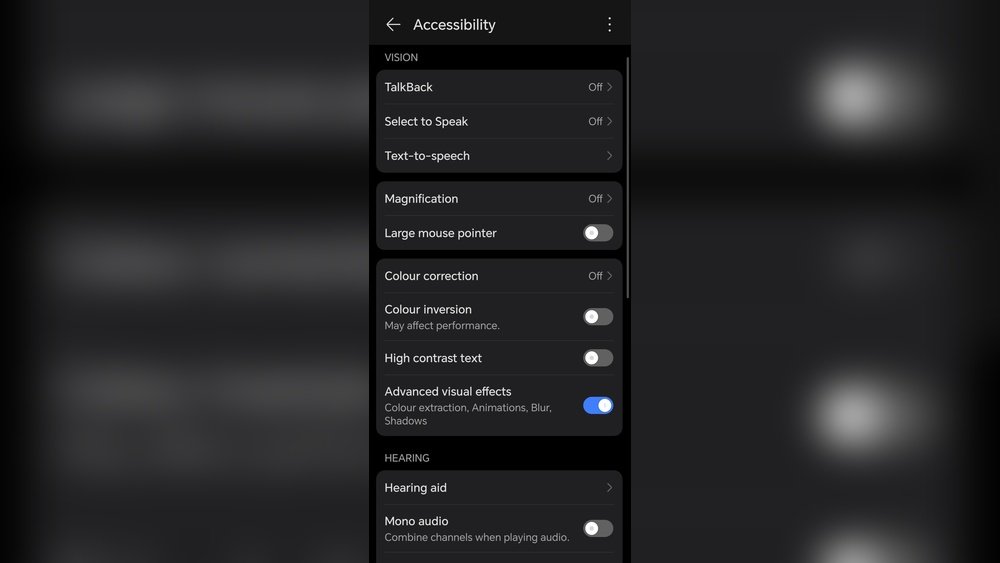
Are you wondering if turning off color correction can actually boost your device’s performance? It’s a question many users face, especially when trying to get the most out of their computers or gaming rigs.
Color correction is designed to make visuals look more natural and accurate, but could it be slowing things down behind the scenes? You’ll discover what color correction really does, how it impacts your system, and whether disabling it might give you that extra edge in speed and responsiveness.
Keep reading to find out if turning off color correction is a smart move for your setup or just a needless tweak.
Color Correction Basics
Color correction adjusts colors to look natural and true to life. It fixes problems like poor lighting or wrong white balance. This process helps make images or videos appear consistent and polished.
Many professionals use color correction to improve the quality of their work. It ensures skin tones and other colors look accurate and realistic. Without it, visuals can appear dull or unnatural.
What Is Color Correction?
Color correction is the process of fixing colors in photos or videos. It balances brightness, contrast, and color tones. This makes the image clearer and more visually pleasing.
It helps remove unwanted color casts, such as a blue or yellow tint. The goal is to create a natural look that matches real life.
Why Use Color Correction?
Color correction ensures all images or clips look consistent. This is important for projects with many shots or scenes. It also improves visual quality by fixing exposure and color issues.
Correct colors help viewers understand the scene better. It can make skin tones look healthier and backgrounds more vibrant. This adds professionalism to photos and videos.
How Color Correction Affects Performance
Color correction requires some processing power from your device. This can slightly affect performance, especially on older or low-end hardware. Disabling it might improve speed but reduce visual quality.
Modern devices handle color correction smoothly with little impact. The balance between performance and image quality depends on your system and needs.

Credit: devforum.roblox.com
Impact On System Resources
Disabling color correction can affect how your system uses resources. Color correction adjusts colors in real-time, which needs extra processing power. Turning it off may lower the load on your CPU and GPU.
This change can improve overall system speed, especially on older or less powerful devices. However, the impact varies depending on your hardware and software setup.
Cpu Usage
Color correction uses the CPU to process color data for each frame. Disabling it reduces this workload. The CPU can then focus on other tasks, which may boost performance in some programs.
On high-end systems, the difference might be small. On low-end or older computers, turning off color correction can free up important CPU resources.
Gpu Load
The GPU handles graphics rendering and color adjustments. Color correction adds extra steps to this process. Disabling it can lower GPU usage, allowing smoother graphics rendering.
This can help in games and video playback, where every bit of GPU power counts. Systems with integrated graphics may see the biggest gains.
Memory Consumption
Color correction requires memory to store color profiles and processing data. Turning it off can reduce the amount of RAM used. This frees memory for other applications and tasks.
Less memory use can improve system responsiveness, especially if your device has limited RAM. It helps avoid slowdowns caused by heavy memory use.
Performance In Gaming
Gaming performance depends on how smoothly a game runs on your device. Many factors affect this, including graphics settings and hardware power. Color correction adds a layer of processing to the image. This extra step may or may not impact your game’s frame rate and responsiveness.
Understanding the effect of disabling color correction helps gamers optimize their experience. It can reduce the work your graphics card must do, potentially boosting performance. Let’s explore the key points in detail.
Impact On Frame Rates
Disabling color correction can slightly improve frame rates. The graphics processor skips the color adjustment step. This saves a small amount of processing power. In fast-paced games, even small gains in frames per second matter.
However, the difference is often minimal. Modern GPUs handle color correction efficiently. You may not notice a big change unless your system is older or weaker.
Visual Quality Vs Performance
Turning off color correction affects image quality. Colors may look less natural or balanced. Some gamers prefer vibrant and accurate colors to spot details better. Disabling color correction can reduce visual clarity, which may hurt gameplay.
Performance improvements come at the cost of color accuracy. Players must decide what matters more: smoother gameplay or better visuals.
Hardware Considerations
High-end gaming setups handle color correction with ease. Disabling it brings little to no benefit here. Lower-end or older machines may gain a small boost. This helps maintain stable frame rates in demanding games.
Gamers with limited hardware should test both options. Find the balance between graphics quality and smooth performance that suits their needs.
Video Editing Effects
Video editing effects shape the mood and style of any footage. They adjust colors, brightness, contrast, and other visual elements. Editors use effects to enhance storytelling and keep viewers engaged. These effects vary in complexity, from simple filters to advanced color grading.
Disabling color correction can impact how smoothly your software runs. Effects, especially color correction, often use significant processing power. Understanding this helps editors balance quality and performance in their projects.
Impact Of Color Correction On Performance
Color correction requires the software to analyze and change many pixels. This process can slow down playback and rendering. Disabling it reduces the load on your computer’s CPU and GPU. This may result in faster editing and previewing.
Other Video Effects And Their Performance Costs
Effects like blurs, transitions, and overlays also affect performance. Some effects need more resources than color correction. Knowing which effects are heavy helps optimize editing speed. Turning off unnecessary effects can improve workflow efficiency.
Balancing Quality And Speed In Editing
Editors must find a balance between visual quality and system speed. Disabling color correction speeds up editing but may reduce image accuracy. Preview with color correction off, then enable it for final export. This approach keeps editing smooth without losing final quality.
Photo Processing Considerations
Photo processing involves many steps to improve image quality. One key step is color correction. It adjusts colors to look natural and consistent.
Disabling color correction can affect the final look of photos. It may speed up processing but could reduce image accuracy. Understanding these effects helps make better editing choices.
Impact On Image Quality
Color correction fixes color imbalances and lighting issues. Without it, photos may appear dull or unnatural. This reduces overall image quality and viewer appeal.
Colors may shift, and skin tones can look off. These problems affect how the photo is perceived. Quality drops noticeably without proper correction.
Processing Speed And Performance
Disabling color correction can speed up photo processing. The computer has fewer calculations to perform. This can be helpful for quick previews or bulk editing.
However, the speed gain is usually small. Modern devices handle color correction efficiently. The trade-off between speed and quality should be weighed carefully.
Workflow Flexibility
Some editing workflows skip color correction early. They rely on later steps to fix colors. This allows faster initial edits and saves time.
Disabling color correction fits simple or non-professional projects. For detailed work, keeping it on ensures better results. Choose based on project needs and goals.
When Disabling Helps
Disabling color correction can improve performance in certain cases. Some devices and software use extra processing power to apply color adjustments. Turning off these effects reduces the workload on the system.
This can lead to smoother playback and faster rendering times. Simple projects or casual viewing do not always need color correction. Skipping it can save resources.
Reducing Gpu Load
Color correction requires the graphics card to process color changes. Disabling it lowers GPU usage. This helps older or less powerful computers run better.
Improving Video Playback
Video players that struggle with color correction may stutter or lag. Turning off color correction can fix playback issues. Videos play more smoothly without extra processing.
Speeding Up Real-time Editing
Editors working live with video or images benefit from disabling color correction. It reduces delays and improves responsiveness. Quick adjustments become easier without color processing.
Saving Battery On Mobile Devices
Mobile phones and tablets use more power for color correction. Disabling it extends battery life. Users can watch videos longer and avoid overheating.
Potential Performance Drain
Disabling color correction may slightly improve performance by reducing processing tasks. Yet, the effect is often minimal and hard to notice during regular use. Color correction usually runs efficiently without causing major slowdowns.
Understanding Resource Usage Of Color Correction
Color correction requires processing power from your device’s GPU and CPU. This extra work can slow down performance, especially on older hardware. The system needs to adjust colors in real-time, which adds a layer of complexity.
Disabling color correction removes this extra load. The device no longer processes color adjustments, which frees up resources. This can lead to smoother performance in games and applications.
Impact On Frame Rates And Responsiveness
Color correction can cause small drops in frame rates. This happens because the graphics processor spends time recalculating colors. Turning it off may improve frame rates and reduce input lag.
For competitive gaming, every millisecond counts. Disabling color correction might give you a slight edge by increasing responsiveness. The difference may not be huge but can be noticeable on less powerful systems.
When Color Correction Affects Battery Life
On laptops and mobile devices, color correction can drain the battery faster. This is due to the additional processing needed to adjust visuals continuously. Turning it off can extend battery life.
Reducing battery usage helps in longer gaming or video editing sessions. Devices stay cooler and run quieter without the extra processing load.
Hardware And Software Factors
Hardware and software play key roles in color correction and its impact on performance. The effect of disabling color correction depends on your computer’s components and the programs you use. Understanding these factors helps you decide if turning off color correction is beneficial.
Hardware Impact On Color Correction Performance
The graphics card (GPU) handles most color correction tasks in real time. High-end GPUs process colors faster, reducing lag and improving smoothness. Older or lower-end GPUs may slow down when color correction is enabled. The CPU also supports color processing but usually to a lesser extent.
Display type matters too. Monitors with better color accuracy show clearer results. Cheaper or older screens may not reveal differences clearly, making color correction less noticeable. RAM size affects how quickly software runs complex color calculations.
Software Influence On Color Correction
Different programs use color correction differently. Video editing software often applies complex corrections in real time. Some apps rely on the GPU, while others use the CPU more. Software optimized for your hardware runs faster and smoother with color correction enabled.
Settings within the software affect performance. Higher resolution and advanced color grading increase the load on hardware. Disabling color correction in simple apps may not improve speed much. Software updates can also change how color correction affects performance.
Balancing Quality And Speed
Disabling color correction can affect both the quality and speed of your work. Color correction improves image accuracy and makes visuals look natural. But it uses extra processing power. This can slow down performance, especially on older devices or complex projects.
Finding the right balance matters. Too much correction can reduce speed. Too little can lower image quality. Understanding how color correction impacts performance helps you choose wisely. This section explores that balance and gives tips to optimize both.
Impact Of Color Correction On Processing Speed
Color correction requires calculations for each pixel. This adds load to the processor or graphics card. Disabling it reduces this load and can speed up rendering or playback. The difference is more visible on low-end hardware. On high-end systems, the impact is often small.
Quality Differences Without Color Correction
Turning off color correction can make images look flat or unnatural. Colors may not match real life. This affects videos, photos, and games. For simple tasks, the quality drop might be acceptable. For professional work, it can harm the final result.
How To Optimize Performance Without Sacrificing Quality
Use basic color correction settings instead of advanced ones. This lowers processing needs but keeps good results. Work with lower resolution previews to speed up editing. Apply color correction only to important scenes or clips. Upgrade hardware if possible for better speed and quality.

Credit: www.reddit.com
User Experience Insights
Disabling color correction can change how users see images and videos. It affects the overall look and feel of the display. Users notice differences in color accuracy and brightness without correction.
Many users report that turning off color correction sometimes improves performance. This is because the system does not need to process extra color data. However, the visual quality may drop, which impacts user satisfaction.
Impact On Visual Clarity
Without color correction, colors may appear dull or washed out. Some users find images less sharp and less vibrant. This can make watching videos or viewing photos less enjoyable. Visual clarity is important for a good user experience.
Effect On System Responsiveness
Disabling color correction can reduce the workload on the graphics processor. Users often feel smoother navigation and faster response times. This is helpful for gaming and graphic-heavy tasks. But the trade-off is lower image quality.
User Preferences And Adaptation
Some users prefer turning off color correction to gain speed. Others do not mind the slight lag for better colors. Over time, users adapt to the display quality they choose. Personal preference plays a big role in this decision.

Credit: www.maybelline.com
Frequently Asked Questions
Should I Turn On Color Correction?
Turn on color correction to fix exposure, white balance, and ensure natural, consistent colors. Skip it for casual or already good images.
What Color Mode Is Best For Gaming?
Full RGB color mode is best for gaming. It offers richer colors and matches game developers’ intended visuals. Choose this for vibrant, accurate gameplay visuals.
Is Color Correction Necessary?
Color correction ensures accurate, natural colors and fixes exposure or white balance issues. It’s essential for professional, consistent results but optional for casual use.
Is Color Correction Damaging?
Color correction itself does not damage hair or skin. Improper chemical treatments during correction can cause damage. Always use professional products and techniques to minimize risk.
Does Disabling Color Correction Improve Gaming Performance?
Disabling color correction can slightly improve performance by reducing GPU load during gaming.
How Does Color Correction Affect Video Playback Speed?
Color correction adds processing, which may slow playback on low-end devices or older hardware.
Will Turning Off Color Correction Save Battery Life?
Yes, disabling color correction reduces processing, which can help extend battery life on portable devices.
Is Color Correction Necessary For Everyday Computer Use?
No, color correction is mainly for visual quality; everyday tasks don’t require it.
Can Disabling Color Correction Cause Color Inaccuracies?
Yes, turning off color correction may result in less accurate and duller colors.
Does Color Correction Impact Photo Editing Performance?
Yes, active color correction can slow editing software due to extra image processing.
Conclusion
Disabling color correction may slightly improve performance on some devices. The impact depends on hardware and software setup. Visual quality often decreases without color correction active. Gamers and editors should balance performance and image accuracy. Simple tests help decide what works best for you.
Color correction enhances color accuracy but can use extra resources. Choose settings that fit your needs and device capabilities.